Getting Started with Claude Cowork: Choose Tasks by Their Shape
Many teams already know how to use an AI chat window. They paste in a question, get an answer, copy the answer somewhere else, rewrite it, and then move it back into the real work file. That works for many small questions. It becomes slow as soon as the job crosses multiple files, multiple apps, or ends with a deliverable that someone else has to open.
Claude Cowork is built for that second category: knowledge-work deliverables. It runs in the Claude desktop app, can work with local folders, and can connect to tools such as Slack, Gmail, Notion, CRM systems, Google Ads, Meta Ads, and Google Search Console. The user describes the outcome, and Claude reads the relevant context, performs the intermediate work, and produces a file, report, dashboard, deck, or spreadsheet.
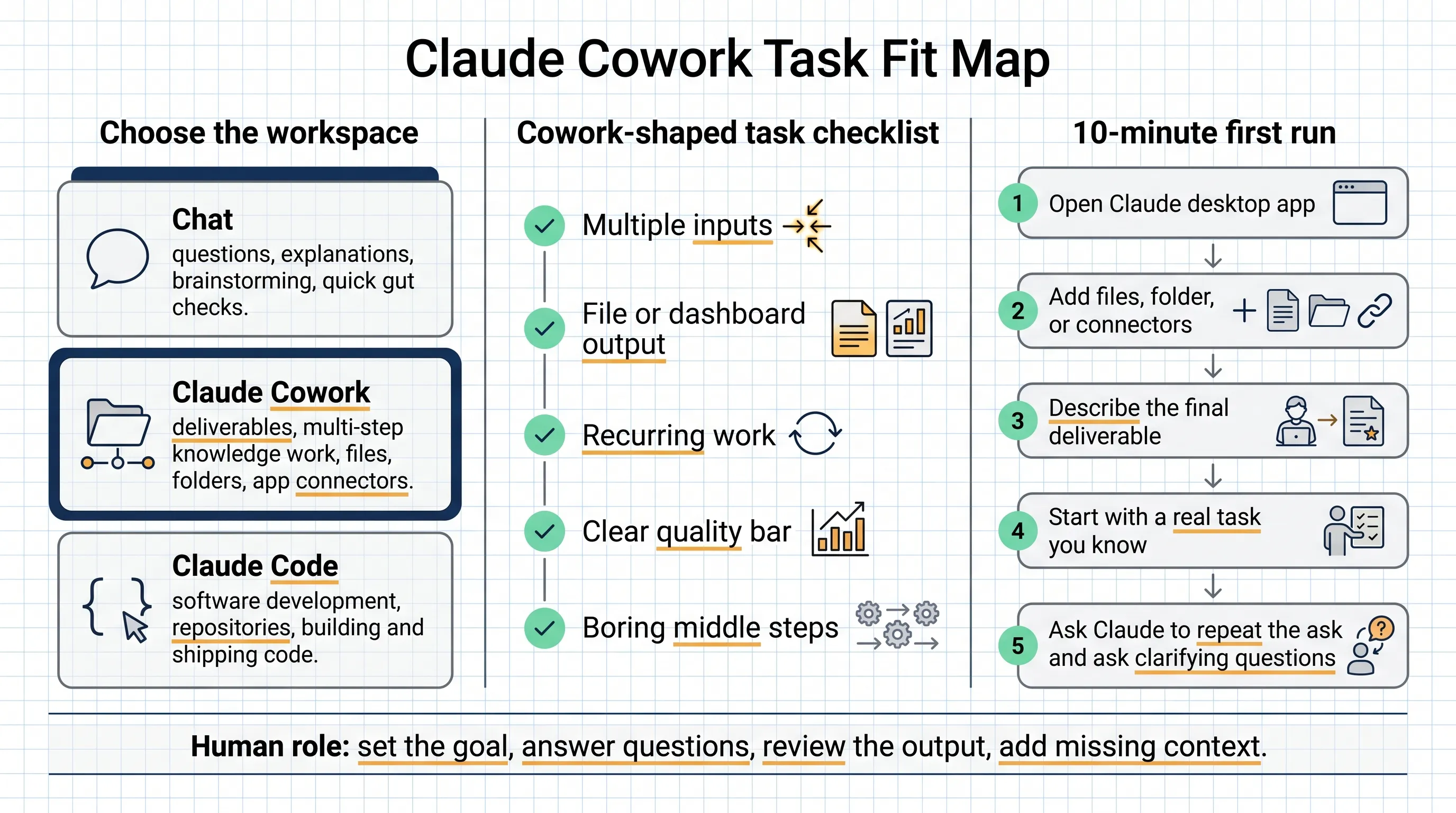
The practical distinction is simple:
| Work to be done | Better workspace |
|---|---|
| Ask a question, get an explanation, brainstorm, or pressure-test an idea | Chat |
| Produce a document, spreadsheet, deck, report, or dashboard from multiple inputs | Claude Cowork |
| Build, modify, test, and ship software from a codebase | Claude Code |
The source article was written by Austin Lau, growth marketing lead at Anthropic. His framing is useful because it does not treat Claude Cowork as a generic AI feature. It treats Cowork as a delegation surface for work that has inputs, steps, and an output.
Chat, Cowork, and Code serve different job shapes
Chat is often the first Claude workspace for knowledge workers. The user brings material to Claude: uploads a file, pastes text, explains the situation, and receives a response. This is good for explanations, brainstorming, short analysis, and thinking out loud.
Claude Cowork reverses the direction. Instead of bringing every piece of work into a chat tab, the user brings Claude into the work environment. Cowork can point at a folder, connect to apps, and work toward a final deliverable. The output is usually something the user can open, edit, attach, present, or reuse.
Claude Code is for developers whose work lives in repositories. If the job is to build, modify, test, and ship software, Claude Code is the better starting point. Anthropic notes that Claude Cowork and Claude Code use the same underlying engine, but the workspaces are designed for different contexts.
That distinction prevents two common mistakes. One mistake is pushing every task through Chat and staying stuck in copy-paste mode. The other is giving Cowork tiny one-off questions that Chat could answer in a few seconds.
Use the shape of the task, not the department name
The article gives a practical way to choose: inspect the shape of the task.
These requests are better suited to Chat:
- “What should I cover in our business review meeting?”
- “How do I use VLOOKUP?”
- “Suggest a better title tag and meta description for this page.”
These are questions. The user needs an answer, a suggestion, or a quick check.
These requests are better suited to Claude Cowork:
- “Read the last three months of meeting notes in this Google Drive folder and build a QBR deck using our template.”
- “Go through these spreadsheets and change all VLOOKUP formulas to INDEX MATCH.”
- “Use the new title tags and meta descriptions for these 30 pages from this sheet and update them using the CMS connector.”
These are tasks. They have multiple inputs, several steps, and a final output.
The five ingredients of a Cowork-shaped task
Austin’s checklist is the most useful part of the article. A task does not need all five ingredients, but the more it has, the stronger the fit.
-
More than one input. The input might be several files, a whole folder, or a file plus app connectors. If the task has only one short input, Chat is often enough.
-
A file or dashboard comes out. Cowork is strongest when the end result is a deliverable: a document, deck, spreadsheet, CSV, report, or dashboard.
-
The task repeats. One-off tasks can still work, but recurring work is the sweet spot. Daily briefings, weekly reports, monthly business reviews, and repeated data cleanups are good candidates.
-
The user knows what good looks like. The human should be able to judge the output quickly. Cowork can execute the middle of the task, but the user still needs to review the result.
-
The middle is mechanical. The hardest thinking happens at the beginning and the end: defining the goal and judging the result. The middle steps, such as extraction, consolidation, formatting, reconciliation, and first-draft writing, are good work to delegate.
A compact rule for teams:
If a task has multiple inputs, a file-like output, a repeat pattern, a clear quality bar, and mechanical middle steps, try it in Claude Cowork.
Example 1: a daily briefing from Slack and Gmail
Austin’s first example is a daily briefing. A marketer can receive too many Slack messages and emails to process manually each morning. He runs a Cowork task every day at 6 a.m.
Claude Cowork connects to Slack and Gmail. The prompt asks it to review unread emails and selected channels, sort the information into buckets, and produce a short report.
The report includes:
- a TLDR of what needs attention,
- flagged emails grouped by type,
- summaries of selected channels,
- overnight product-related incidents that may affect marketing.
This maps cleanly to the checklist: Slack and Gmail are multiple inputs, the report is the output, the work repeats daily, and the human reviews the final report to decide what to act on.
For a first internal pilot, a team should keep the scope narrow. For example, give Cowork three fixed channels and unread emails, then ask for a one-page morning summary. A small stable task is easier to evaluate than a broad “summarize everything” workflow.
Example 2: budget pacing as a live dashboard
The second example is performance marketing budget pacing.
Many marketing teams track daily spend and run rate in spreadsheets. The manual workflow is tedious: export daily spend from each ad platform, paste it into a sheet, and calculate pacing against the target. Another option is to pay for a third-party ETL tool.
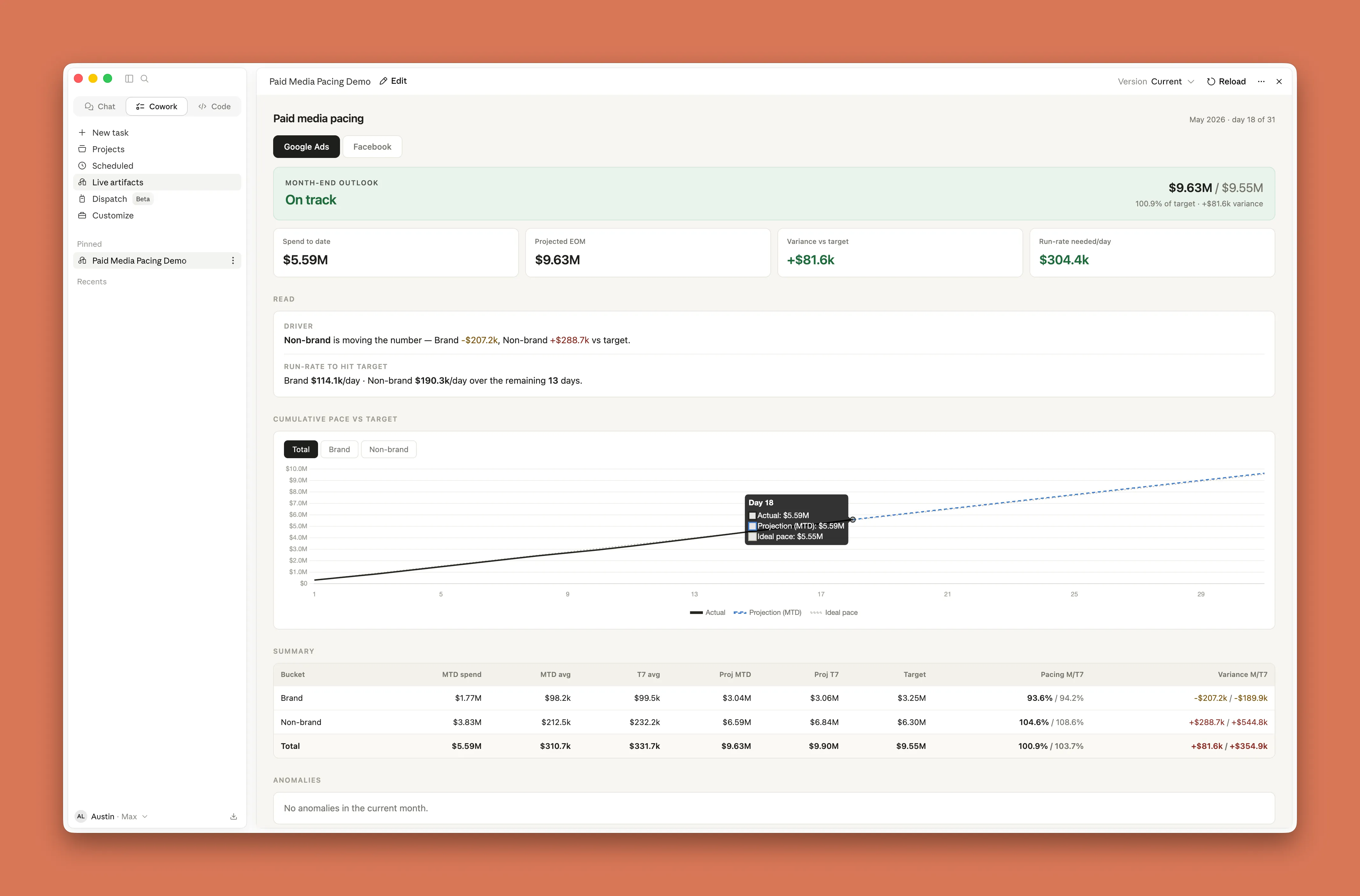
Austin connects Claude Cowork to Google Ads and Meta Ads and creates a live artifact in the desktop app. The artifact is essentially an HTML dashboard that pulls daily spend and calculates pacing. He can also tell Claude in plain English which campaigns to filter and what to watch for.
This task has multiple ad-platform inputs, a dashboard output, frequent repetition, and a mechanical middle: download, copy, paste, calculate, and reformat. The human role shifts to defining filters, explaining what matters, and checking the output.
Example 3: reporting from Google Search Console
The third example is reporting.
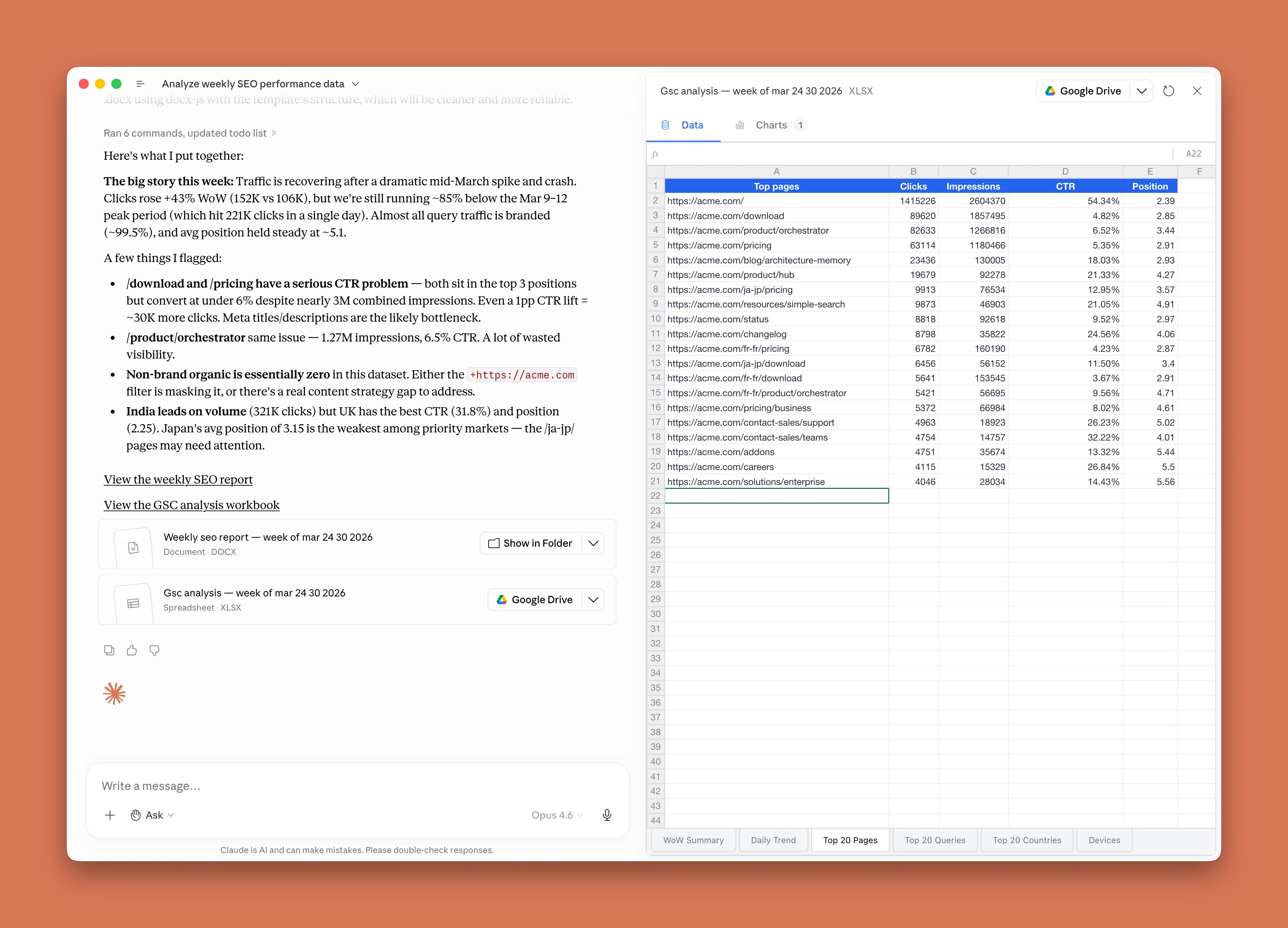
Manual Search Console reporting often means exporting separate CSV files by query, country, and page, then combining them into one report. Austin connects Claude Cowork to Google Search Console and has it pull the data he cares about into a single sheet.
He also gives Claude context:
- compare the last seven days with the prior seven days,
- filter to specific countries,
- flag meaningful movement,
- write the report in a known template.
With scheduling, the workflow runs weekly. The work that used to take about 30 minutes now takes about five minutes. Those five minutes are spent on the part that still needs human judgment: filling in missing context and refining the callouts.
The pattern matters more than the marketing use case. Cowork removes the repetitive data preparation and first-draft writing. The human still supplies the business interpretation.
A 10-minute first run
Austin’s first-run process is short enough to use directly:
- Open the Claude desktop app and switch to the Claude Cowork tab.
- Give Claude something to work with: a few files, a folder, or an app connector such as Slack, Gmail, Notion, or a CRM.
- Describe the outcome you want. Name the final deliverable and include the necessary context.
- Start with a real task you know well. Familiar work makes it easier to judge whether the output is right.
- Ask Claude to clarify before it starts.
The recommended prompt habit is:
Before we begin, repeat my ask back to me so we’re aligned, then ask me as many clarifying questions as you have.
This surfaces missing details: time period, quality expectations, edge cases, file restrictions, and the intended audience. Spending 30 seconds on clarifying questions is cheaper than discovering the same gaps after the task has already run.
A small NSSA pilot: product feedback weekly report
For an organization like NSSA, a small pilot could be a product feedback weekly report.
Inputs:
- customer support tickets,
- product group notes,
- the previous week’s release notes.
Output:
- a Markdown weekly report for product managers,
- grouped feedback themes,
- repeated issues,
- representative comments,
- items that require human confirmation.
The first version should be read-only. Claude Cowork can read the material and draft the report, but it should not update tickets, reply to customers, or change the product roadmap. That preserves human review, auditability, and rollback options while the team learns how the task behaves.
This pilot maps to the article’s checklist: multiple inputs, a file output, repeated weekly work, a clear quality bar, and a mechanical middle step of extraction and grouping.
When Chat is still the right choice
Chat remains useful. It is the better place for discussing a positioning problem, pressure-testing an idea, asking a quick how-to question, or getting a fast explanation.
Claude Cowork is better when the result becomes work product: a document, spreadsheet, deck, report, or dashboard that someone else can open or continue editing.
Review checklist
- Use Chat for questions and quick thinking.
- Use Claude Cowork for multi-step knowledge-work deliverables.
- Use Claude Code when the work lives in a codebase.
- Choose the first Cowork task by checking inputs, output, recurrence, quality bar, and mechanical middle steps.
- Add a clarification step before execution so Cowork can repeat the ask and ask questions.
Source
- Source: Claude Blog
- Title: Best practices for getting started with Claude Cowork
- Author: Austin Lau, growth marketing lead at Anthropic
- URL: https://claude.com/blog/best-practices-for-getting-started-with-claude-cowork
- Published: June 3, 2026