How to Build a Custom Agent Harness: A Practical Reading Note
Many agent prototypes start the same way: give a model a system prompt, register a few tools, and let the model call those tools in a loop until it returns a result. That can work for a demo. It becomes harder in real workflows.
The difficult questions usually appear outside the model call. What context should the model receive at each step? Who initializes and cleans up tools? What happens when a tool fails? Who compresses message history when a long task approaches the context window? Should PII checks, approval gates, and cost controls live in a prompt or in code?
LangChain’s article “How to Build a Custom Agent Harness” gives a useful engineering frame:
agent = model + harnessThe model reasons and calls tools. The harness connects the model to context, data, tools, state, policies, and the execution environment. If the model sets the capability ceiling, the harness determines whether the agent can work inside a real product workflow.
Start with the Base Loop
LangChain defines an agent as a model calling tools in a loop until it completes a task and returns a result. create_agent is the base primitive for building that loop:
from langchain.agents import create_agent

agent = create_agent(
    model="anthropic:claude-sonnet-4-6",
    tools=tools,
    system_prompt="you are a helpful assistant..."
)
This creates a working agent from a model, a tool set, and a system prompt.
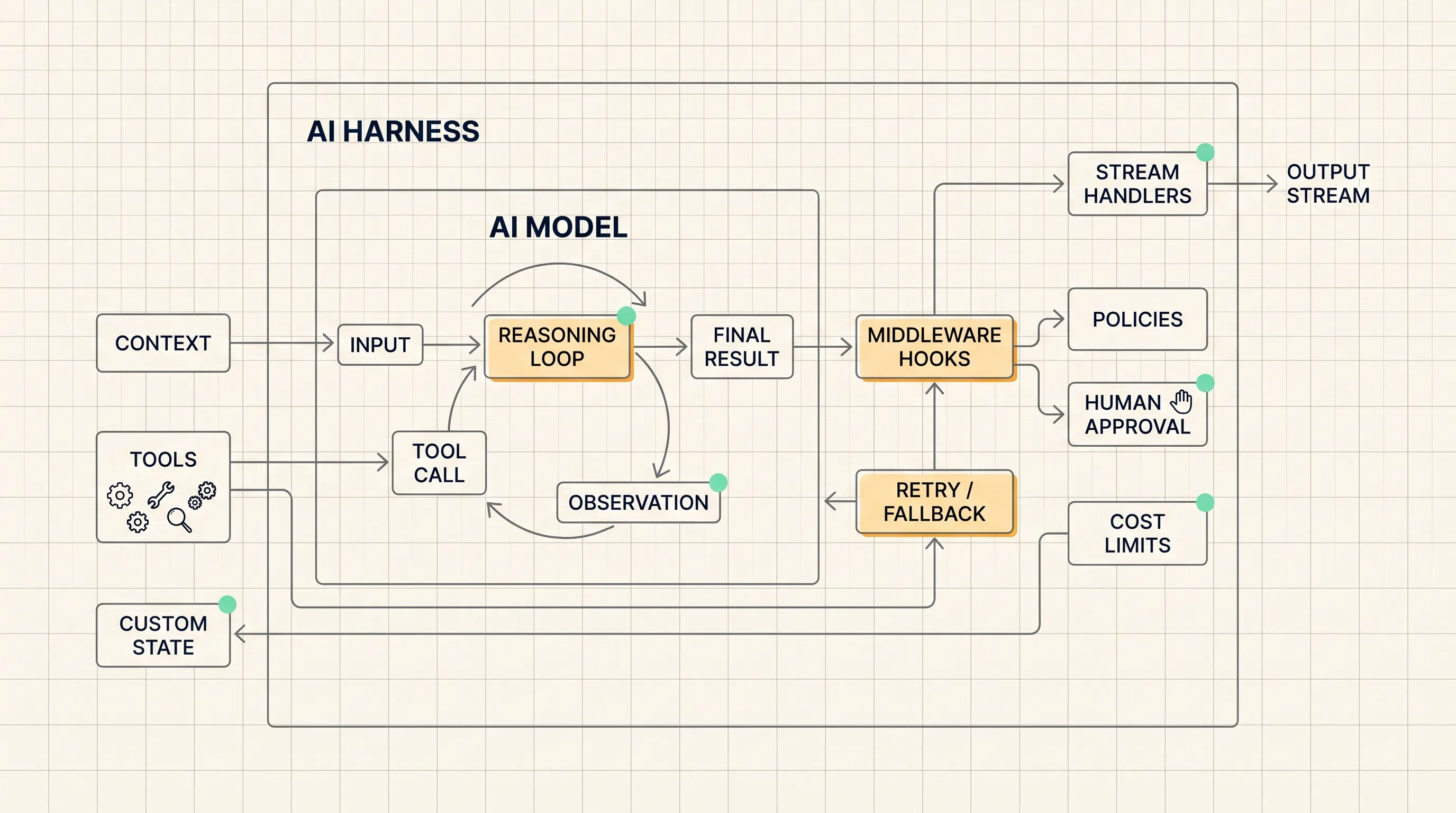
Pre-assembled harnesses such as Deep Agents and the Claude Agent SDK include opinionated middleware stacks: memory, context management, sandboxing, and other production-oriented capabilities. They are useful when you want to reach a working production shape quickly.
create_agent takes a lighter approach. It keeps the core agent loop minimal and exposes middleware as the customization layer. That matters when the real problem is custom prompting, business logic, guardrails, tool lifecycle, state tracking, stream routing, approvals, or cost limits.
A good first diagnostic is simple: has the agent’s failure mode moved outside the model?
If the problem is tool initialization, context overflow, audit logging, cost growth, approval gates, or policy enforcement, adding more prompt instructions will usually be the wrong lever. The harness needs to carry that work.
Middleware Hooks into the Agent Loop
Middleware can run at several points in the agent loop: before and after model calls, before and after tool calls, at agent startup, and during teardown. Each middleware unit handles one concern and can compose with others.
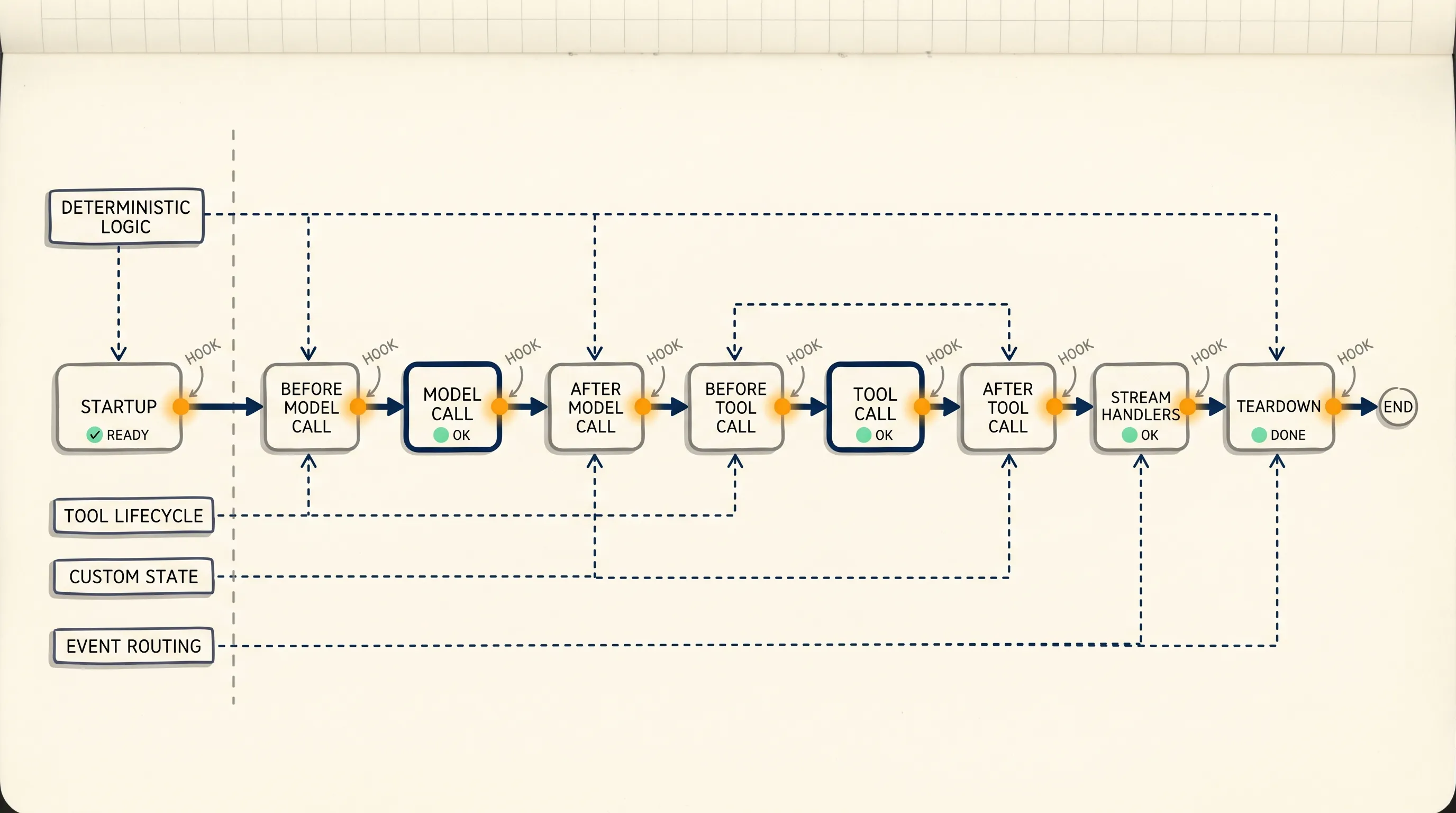
This gives the agent a stable code path for work that must happen every time.
Deterministic Logic
Business logic, policy enforcement, and dynamic agent control need fixed execution points. Examples include switching the model based on task complexity, adjusting the prompt at runtime, or updating message history after compaction.
These actions are better handled by middleware because they are not only behavioral preferences. They are control logic. They need clear inputs, predictable timing, and inspectable results.
Tools
Tools can be registered directly on the agent, but middleware can manage the full tool lifecycle: setup, teardown, registration, and final handoff to the agent.
This is useful when tools have dependencies, require initialization, or need to close connections and clean temporary state at the end of a run. It also keeps tool configuration close to the logic that governs tool usage.
Custom State
Middleware can extend the agent’s state with custom properties. That allows state to persist across hooks during a run: counters, flags, phase markers, approval state, compaction counts, or other values.
This is different from putting state in the prompt. Prompt state can be forgotten or rewritten by the model. Agent state can be checked and updated by code.
Stream Handlers
Production systems often need more than the final answer. A UI may consume token deltas. An audit log may need tool calls. A monitoring system may need latency and event metadata.
Stream handlers can intercept and transform the agent output stream. They can filter events, inject metadata, or route different event types to different consumers.
The Capability-to-Middleware Map
The most practical part of the LangChain article is the capability map. It shows common production-agent requirements and the middleware that can support them.
| Capability | Problem It Handles | Middleware |
|---|---|---|
| Prevent context overflow | Long sessions accumulate message history quickly. Without intervention, the agent can exceed the context window. | SummarizationMiddleware, ContextEditingMiddleware |
| Access and update memory | Load relevant knowledge at startup and write it back at the end of a run. The agent can improve from real usage. | FilesystemMiddleware, MemoryMiddleware, SkillsMiddleware |
| Take actions in an environment | A fixed toolset limits what an agent can do. File system and execution access unlock more complex solutions. | ShellToolMiddleware, FilesystemMiddleware, CodeInterpreterMiddleware |
| Delegate tasks | Subagents can handle complex subtasks with cleaner context windows. A todo list can track progress across long runs. | SubAgentMiddleware, AsyncSubAgentMiddleware, TodoListMiddleware |
| Handle transient failures | Models and tools fail unpredictably. Production agents need retries with backoff and fallbacks. | ToolRetryMiddleware, ModelRetryMiddleware, ModelFallbackMiddleware |
| Enforce policies | PII handling, compliance checks, and approval gates must fire on every call. They cannot depend on the model remembering instructions. | PIIMiddleware, HumanInTheLoopMiddleware |
| Steer the agent | Some actions need a pause before execution, with a human approving, rejecting, or redirecting the agent. | HumanInTheLoopMiddleware |
| Control costs | Prompt caching can reduce token spend in long tasks. Call limits stop costs from growing unchecked. | ModelCallLimitMiddleware, ToolCallLimitMiddleware, PromptCachingMiddleware |
This table works well as a design review checklist. Put an agent project next to the table and ask: will the task run for a long time, touch sensitive data, call side-effecting tools, fail unpredictably, need human approval, or generate runaway cost?
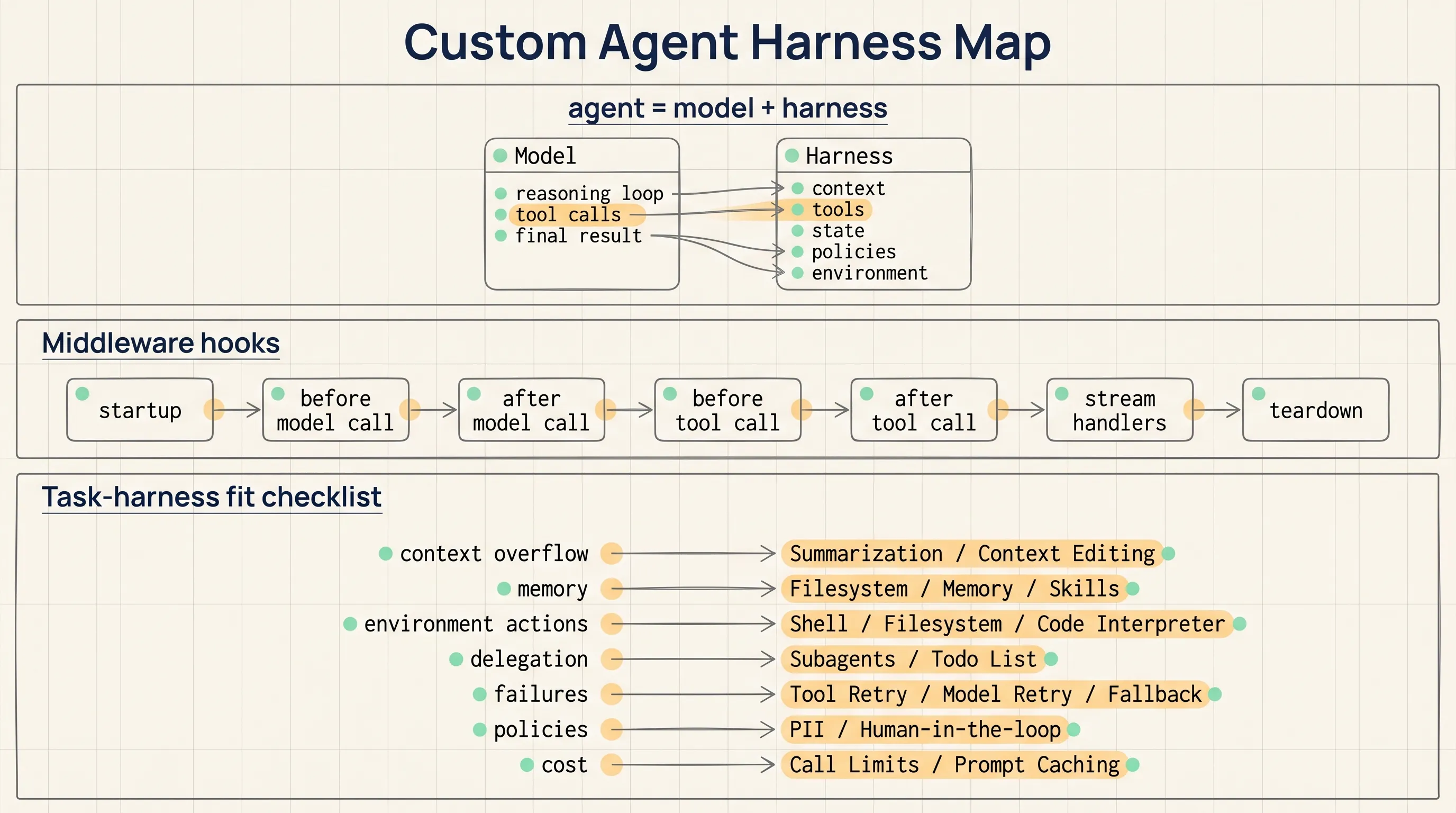
The answers determine the middleware stack.
Task-Harness Fit
LangChain uses the phrase “task-harness fit” to describe how well a harness matches the demands of a task: the context the task needs, the failures it will encounter, the policies it must enforce, and the environment it operates in.
A customer service agent and a long-running coding agent should not use the same harness shape.
A customer service agent may need retrieval, memory, PII handling, approval gates, and consistent response behavior. A coding agent may need file system access, shell execution, context compression, task delegation, retry logic, and cost controls.
The right design questions are:
- What context does the task need?
- Which tools and environments will the agent access?
- What failures are expected?
- Which policies must run every time?
- Which actions require human approval?
- What cost limits should be enforced?
LangChain says its GTM agent, asynchronous coding agent, and no-code agent builder are all built on create_agent, but each uses a middleware stack tailored to its mission. The difference comes from the task, not from the generic word “agent.”
A Minimal Exercise: A Read-Only Code Review Agent
A small code-review agent is a good way to practice the harness idea.
The task: read a repository, inspect one module, identify risks, and generate suggested fixes. The first version should not write files.
That task needs several capabilities.
First, file access. FilesystemMiddleware can give the agent a controlled way to read the repository. If the task later needs tests or scripts, ShellToolMiddleware or CodeInterpreterMiddleware may be added.
Second, context management. Repository analysis can produce a large amount of message history. SummarizationMiddleware or ContextEditingMiddleware can keep the working context usable.
Third, progress tracking and delegation. A complex review can be split into smaller steps: read entry points, map dependencies, inspect error handling, and produce a risk list. SubAgentMiddleware and TodoListMiddleware can support this pattern.
Fourth, human approval. The first version should only read code and produce suggestions. Any file write or deployment command should pause for human review. HumanInTheLoopMiddleware fits that role.
Fifth, cost control. Long code analysis can accumulate calls quickly. ModelCallLimitMiddleware and ToolCallLimitMiddleware can put hard caps on the run.
The exercise is not about building the perfect coding agent in one pass. It is about proving that context, tools, state, approval, and cost are visible and controllable.
Prompt Logic vs Middleware Logic
Prompts are still useful. They are good for role, tone, task goals, output format, and general behavior.
Middleware is better for logic that must run at a predictable point and must be inspectable by code.
Use middleware when the logic:
- must run on every call,
- needs external state,
- updates internal state,
- initializes or cleans up tools,
- pauses for human approval,
- records audit or monitoring events,
- enforces cost or call limits.
Use the prompt when the instruction is about how the model should speak, reason, or format its answer.
This split keeps prompts from becoming overloaded. The prompt guides the model. The harness manages execution.
NSSA Practice Scenario
For a company like NSSA, a practical first exercise would be a read-only code review agent inside the engineering workflow.
The agent can read a selected repository and module, produce a risk list, and suggest changes. It cannot write files in the first run. It should show which files it read, which risks it found, and which actions require human approval.
A first middleware stack could include:
- file system access for repository reading,
- context editing or summarization for long files,
- a todo list for review progress,
- human-in-the-loop approval before file writes or shell commands,
- model and tool call limits for cost control.
The review output should be easy to check: file paths, risk descriptions, suggested changes, and pending approvals.
Review Notes
The article is short, but the method is reusable:
- Start with
agent = model + harness. - Keep the base loop minimal with
create_agent. - Put stable execution logic into middleware.
- Choose middleware from the task’s context, tools, failures, policies, approval needs, and cost limits.
- Test the first harness with a small task where every action can be inspected.
Source
- LangChain Blog: “How to Build a Custom Agent Harness”
- URL: https://www.langchain.com/blog/how-to-build-a-custom-agent-harness
- Published: June 3, 2026
- Topic: agent harness,
create_agent, middleware, task-harness fit